Several games at once
Each game instance has its own control pipe, so one test PC runs several games side by side. A clone of an instance takes a few seconds and about 90 MB.
pwsh -NoProfile -File clone-instance.ps1 -Slot 2       # versions\1.26.51.01-hi2, ~90 MB, seconds
& .\Start-BeDDGame.ps1 -Instance 1.26.51.01-hi2        # starts it without bringing it forward
Connect-BeDD -PipeName BeDD-1.26.51.01-hi2             # the pipeName in that instance's config
Start-BeDDGame.ps1 -Slot 2 (or -Instance <base>-hi2) makes the clone itself when it is missing. Without
-Instance it starts the base instance Be.D.D. finds, or its clone for -Slot 2 and up. clone-instance.ps1 takes
slots 1 to 32; for a higher slot use New-BeDDClone -Source <base> -Slot 41 from BeDDSetup.psm1. An existing clone
is brought up to date when its base instance has changed.
Rules for parallel runs
A clone has its own mods\, logs, worlds and options. A few rules keep parallel runs from tripping over each other:
- Give every instance its own lock file, and find your game by its instance folder, never just by the name
Minecraft.Windows(or you close someone else's game). - Start games as
Minecraft.Windows.exe(Start-BeDDGame.ps1does): under another file name the game uses your normal Minecraft profile instead of the instance's. - Make test worlds single-player with
Set-WorldSinglePlayer <worldDir>(from the harness shim): games on one PC share an online sign-in, and multiplayer worlds opened at the same time fail with "An error has occurred" (code "Blaze"). - A run that joins a server online sets
$script:ExclusiveSignaling = $truebeforeStart-Gameand gets the PC to itself while the other games close.
Starting a game
Start-BeDDGame.ps1 runs versions\<Instance>\Minecraft.Windows.exe directly, so the game never takes the
foreground (LeviLauncher is not needed: the exe loads LeviLamina itself). It returns the process. The instance must
have the module in mods\BeDD (Install-BeDDMod), and the manager window must start: otherwise
it throws.
| Parameter | |
|---|---|
-Instance <name> | the instance to start (default: the one Be.D.D. finds) |
-Slot N | its clone <base>-hi<N> instead |
-VersionsDir <dir> | LeviLauncher's versions folder |
-Label <text> | the game's name in the manager window (default: the project and worktree of the calling script) |
The manager window
The first Start-BeDDGame.ps1 of your logon session opens the manager window, and every later run (from any
terminal, harness or agent) reuses it. Every game shows up there as a live picture, and nowhere else: its own window
stays off screen, with no taskbar button and nothing in Alt+Tab, so no windows pop up and vanish while several runs
start and close games. It never takes the focus.
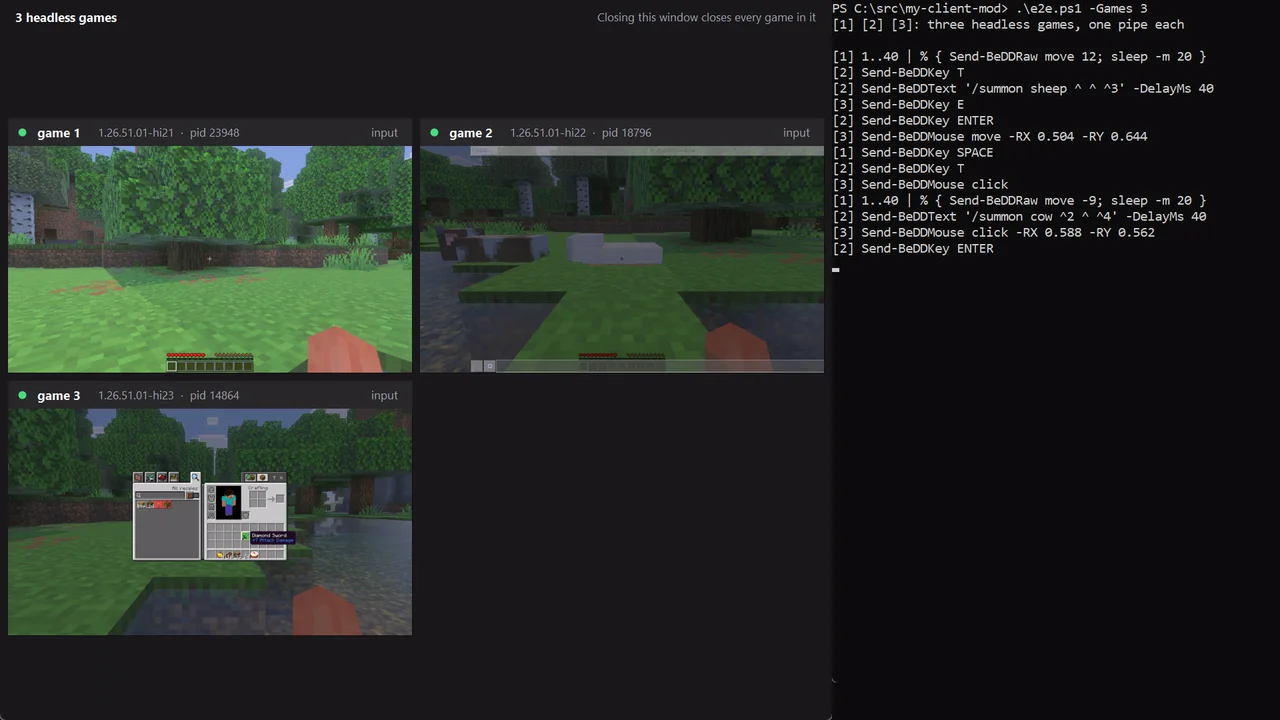
- Each game is labelled with the project (and worktree) of the script that started it, its instance and pid, and
whether input is arriving.
-LabelonStart-BeDDGame.ps1names it. - Closing the manager window closes every game in it (it asks first). The games also go if the manager is killed, so nothing is left running in the background.
- Double-click a game to show only that one. Right-click it to open its
latest.logor instance folder, or to close it. - From a script:
BeDDManager.ps1 -Listlists the games,-Game <pid> -Action closecloses one,-Shutdowncloses the manager and every game without asking.
It needs PowerShell 7 (pwsh). A game never runs without it: a game that finds no manager window starts one (config
managerScript), and a game that no manager links within 90 s, or that loses its manager for good, closes itself
(the reason is in its latest.log).