Introduction
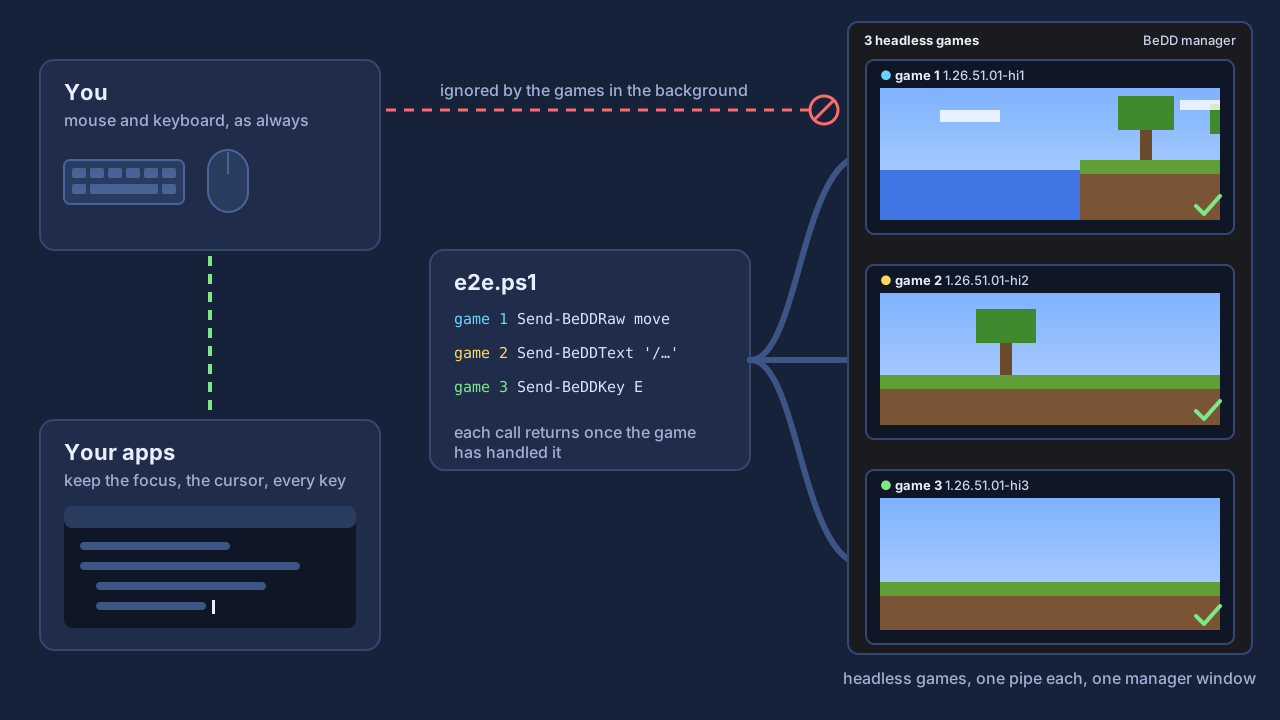
Be.D.D. runs end-to-end tests of your LeviLamina client mods in the background. Your script presses keys, types and clicks inside Minecraft Bedrock, while your own mouse, keyboard and windows stay yours, and several games can play at once.
A testing tool
A game with Be.D.D. in its mods\ folder ignores your real mouse and keyboard and shows up only in the manager
window. Do not leave Be.D.D. in a game you play.
What is in it
Be.D.D. is a testing toolkit, not a mod for players. A release (bedd-client-windows-x64.zip) holds:
| Part | |
|---|---|
BeDD.dll, manifest.json | the client-side LeviLamina module your harness puts into the game instance for a run |
BeDD.psm1 | the PowerShell client: Connect-BeDD, Send-BeDDKey, Send-BeDDMouse, Save-BeDDScreenshot, … (Driving the game) |
harness-shim.ps1 | drop-in replacements for the input helpers of LeviLauncher harnesses (Plugging into a harness) |
Start-BeDDGame.ps1 | starts a game instance without bringing it forward |
BeDDManager.ps1 | the manager window that shows every game, the only place a game shows up (Several games at once) |
clone-instance.ps1 | makes a cheap clone of an instance for a parallel run |
BeDDSetup.psm1, Initialize-BeDD.ps1 | find the game instance and set up whatever the PC lacks (Setting up a new PC) |
Only the test PC's game needs it; servers and players do not. Be.D.D. is not a lip package and is not listed on LeviMC Mods: you download it from the releases.
Features
- Keep using your PC. The game never takes the foreground, the cursor or your keystrokes, and your clicks never land in it.
- Several games at once. Each game instance has its own pipe; a cheap clone of an instance takes a few seconds.
- One window for all of them. The games of every test run on the PC show up live in one manager window instead of popping up on your desktop; closing it closes them all.
- Plays like a player. Keys, chat, key bindings, menus, hover tooltips, clicks and the camera all work as with a real mouse and keyboard.
- Deterministic. Every call returns once the game has handled the input, so no guessing sleeps.
- Screenshots of covered windows. The manager window can sit behind your other windows.
- Drop-in for existing harnesses. One file replaces the usual
Click,Press-Key,Focus-Gamehelpers of LeviLauncher harnesses; scenarios stay as they are.
Requirements
- Windows x64 and PowerShell 7 (
pwsh) for the manager window. - Minecraft Bedrock Edition 1.26.51 (GDK) with LeviLamina 26.51.x (client), in a game instance installed
with LeviLauncher. Tests start that instance with
Start-BeDDGame.ps1rather than through the launcher.
On a PC that has none of this yet, the scripts set up everything except the game itself: see Setting up a new PC.
The name
Be.D.D. (Bedrock Deep Dive) is named after the H.D.D. of Zenless Zone Zero: a Proxy guides agents through the Hollows from afar, your script guides Minecraft from the background.
Next
Install it, then drive a game.